
If you trade actively, you’ve probably noticed that modern trading platforms are trying to do much more than draw candlesticks.
TrendSpider takes that idea quite a bit further. The platform combines charting and technical analysis with market scanning, automated analysis, strategy development, backtesting, alerts, trading bots, machine-learning tools and AI assistance.
That breadth is one of the main reasons to consider TrendSpider — and also one of the reasons it can take time to learn.
In this TrendSpider review, we’ll look at the platform from a trader’s perspective: what it does, what the current plans offer, how its scanning and backtesting tools work, where AI fits in, what limitations to understand, and which types of trading workflows may benefit most from the platform.
Pricing and product details are time-sensitive. The pricing information below was checked against TrendSpider’s current first-party pricing materials and should be verified again before subscribing.
Disclosure: TradeORI may earn a commission if you sign up through our TrendSpider affiliate link. That relationship does not change our assessment of the platform.
TradeORI Research
Quick Snapshot

*Displayed pricing, promotions and billing terms can change. Verify current pricing before subscribing.
TrendSpider Pros and Cons
PROS
Where TrendSpider may add value
- Broad research toolkit Charting, scanning, strategy testing, alerts, automation and AI-assisted workflows in one platform.
- Powerful scanning Multi-factor conditions across technical, fundamental and other data categories.
- No-code strategy development Visual tools allow users to construct and test strategies without conventional programming for the core workflow.
- Automation Strategies can be deployed into alerts and strategy bots, depending on setup and plan.
- AI-assisted workflows Sidekick and other AI capabilities can assist with research and strategy development.
CONS
Things to consider
- The platform can be complex The large feature set can create a learning curve, particularly around advanced strategy and automation workflows.
- Pricing requires attention Promotional pricing, renewal terms, usage limits, market-data requirements and optional add-ons can affect the actual cost.
- AI usage has limits Base subscriptions include a monthly Sidekick message allowance, with additional usage available through paid packages.
- Backtests have assumptions Historical testing cannot eliminate execution, liquidity, data and future-market uncertainty.
- Data can vary between platform functions Different platform functions can use different third-party data providers.
What Is TrendSpider?
TrendSpider is an all-in-one market research and trading platform built around technical and fundamental analysis.
Its current product suite includes charting, automated technical analysis, market scanning, strategy development, backtesting, alerts, trading bots, machine-learning tools and Sidekick AI.
That makes it different from a platform that is primarily a charting workspace.
The basic workflow can look something like this:
Find an opportunity → analyze it → define a strategy → backtest it → refine it → create alerts or automation.
You don’t have to use every part of that workflow. But if you want several of those capabilities in one environment, TrendSpider is designed around that use case.
The TrendSpider Workflow
Discover
Market Scanner
Analyze
Charts & Technical Analysis
Build
Strategy Development
Test
Backtesting
Automate
Alerts & Trading Bots
TradeORI Insight
TrendSpider’s value isn’t simply the number of tools it offers. It’s the way market research, strategy development, testing and automation can be connected within one workflow.
TrendSpider Pricing in 2026
Pricing is one of the trickier parts of evaluating TrendSpider because the company currently uses promotional offers and multiple levels of usage capacity.
At the time of checking, TrendSpider listed four primary plans:
Pricing & Plan Capacity
| Plan | Starting price* | Open workspaces | Trading bots | Alerts | Backtesting |
|---|---|---|---|---|---|
| Standard | From $52.38/month | 5 | 5 | 10 | 2-hour, 2K depth |
| Premium | From $65.52/month | 10 | 10 | 50 | 5-minute, 10K depth |
| Enhanced | From $87.84/month | 15 | 50 | 100 | 1-minute, 20K depth |
| Advanced | From $154.08/month | 20 | 100 | 400 | 1-minute, 30K depth |
*Displayed prices are promotional rates and can vary by plan, billing period and offer. Standard pricing applies after the introductory period. Verify current pricing before subscribing.
The important point is that TrendSpider’s plans are primarily differentiated by usage limits and capacity, rather than by removing the platform’s major feature suites. TrendSpider says all four plans provide access to its tools and features, with limits varying by plan.
The important difference between the plans
One useful detail is easy to miss.
TrendSpider says its four pre-built plans provide full access to its tools and features, while the usage limits vary.
The plans share the major feature suites. The meaningful difference is how much of those tools your workflow can use.
Light workflow
A smaller watchlist, fewer setups and limited alert or strategy activity.
Active workflow
More scans, strategies and alerts across a broader trading workflow.
High-capacity workflow
Larger watchlists, more automation and greater testing capacity.
TradeORI Lens: The relevant plan depends on how heavily you intend to use the platform’s capacity, not simply on whether a feature exists.
For a trader following a relatively small number of setups, the lower-capacity plan may be sufficient. A trader running many scans, strategies, alerts or bots can reach the limits much sooner.
Additional data and add-on costs
TrendSpider also offers optional add-ons and upgrades.
Cost Watch
Potential additional costs
Before subscribing: Your actual cost can depend on market-data requirements, professional status and optional upgrades.
The company also states that non-professional users do not incur additional fees for real-time U.S. equities, ETFs, forex and crypto data, while futures data is optional.
Professional market-data requirements can differ, so traders should check their own status and the current pricing terms.
The practical lesson is simple: when calculating the cost of TrendSpider, look beyond the headline subscription price.
Does TrendSpider have a trial?
Yes. TrendSpider’s current pricing pages advertise a 14-day trial.
Trial
Trial charges, promotional subscription pricing and renewal terms can vary. Check the checkout terms before subscribing.
The amount charged for the trial and the promotional subscription price can vary by plan and promotion, so check the checkout terms before subscribing.
TrendSpider also states that subscriptions renew automatically by default unless the user disables auto-renewal.
Ready to explore TrendSpider?
Check the current plans, trial terms, and available features directly on TrendSpider.
TrendSpider Features
Charting and automated technical analysis
TrendSpider goes beyond conventional charting by incorporating automated technical-analysis capabilities into its workflow.
The platform supports technical and fundamental chart analysis, automated analysis, pattern recognition and multi-timeframe workflows.
The practical benefit is less about having another chart and more about reducing some of the repetitive work involved in analyzing markets.
Instead of manually checking every symbol for a particular setup, you can combine chart analysis with scanning and alerts.
That becomes more useful as the number of markets or setups you follow increases.
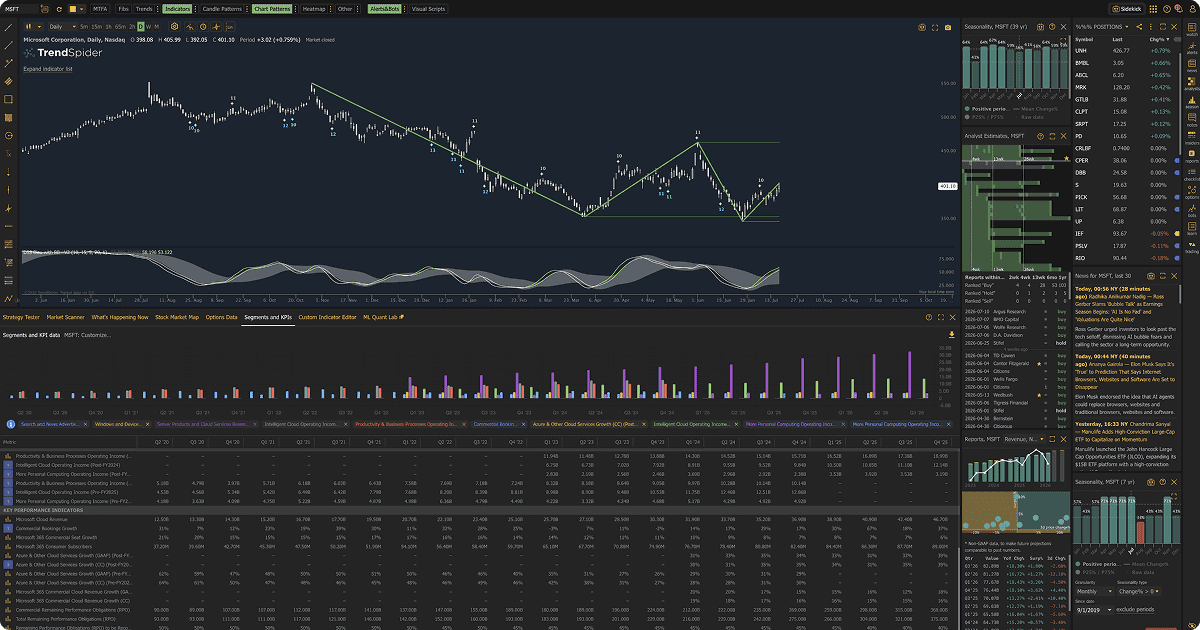
TrendSpider’s charting workspace combines technical analysis, automated analysis and market data in one interface.
Feature Spotlight
Automated analysis inside the chart
TrendSpider goes beyond conventional charting by incorporating automated technical-analysis capabilities into its workflow.
The platform supports technical and fundamental chart analysis, automated analysis, pattern recognition and multi-timeframe workflows.
Market Scanner
The Market Scanner is one of TrendSpider’s more substantial tools.
Its documentation says traders can build custom scans using technical and fundamental conditions, with additional inputs including price, indicators, candlestick and chart patterns, AI models, fundamentals, relative performance, analyst estimates, news, earnings, dividends, splits and watchlists.
The scanner also supports multiple timeframes, with TrendSpider documenting support for up to three timeframes in a scan.
This can be useful for traders who think in terms of conditions rather than individual charts.
Feature Spotlight
Scan markets by conditions, not just symbols
TrendSpider’s Market Scanner lets traders combine technical, fundamental and other market conditions to identify symbols that match a specific setup.
Scans can also use multiple timeframes, making it possible to search for combinations of conditions rather than reviewing individual charts one by one.
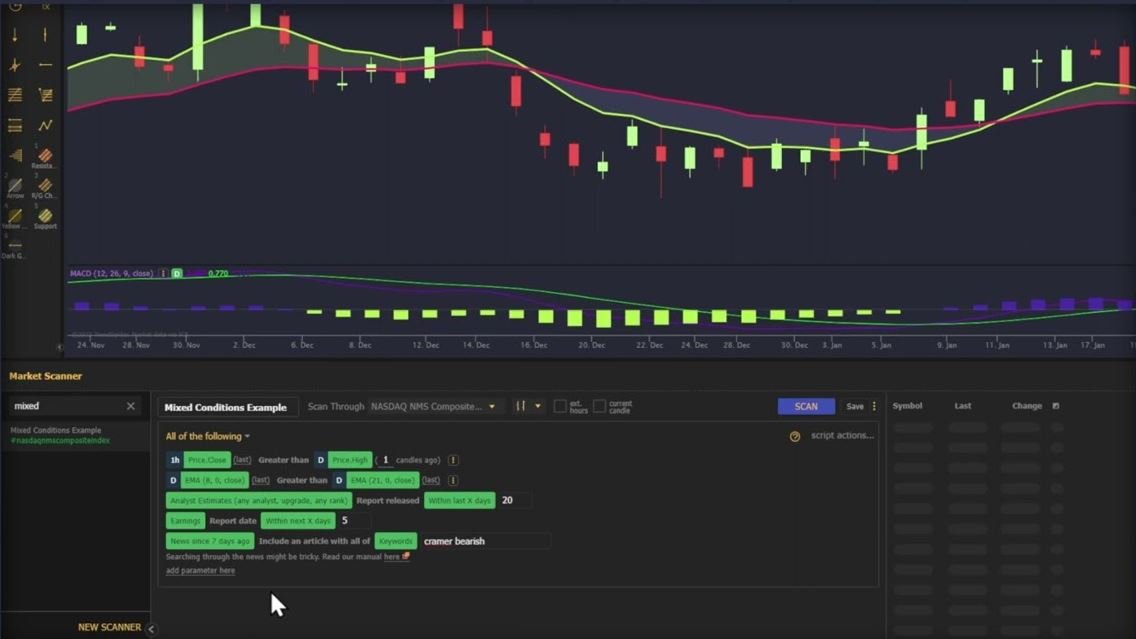
TrendSpider’s Market Scanner can filter symbols using custom conditions and multiple timeframes.
For example, instead of manually searching for stocks that meet several requirements, you can build a scan around those conditions and let the platform identify matching symbols.
Alerts
TrendSpider’s alert system is designed to notify traders when predefined market conditions occur.
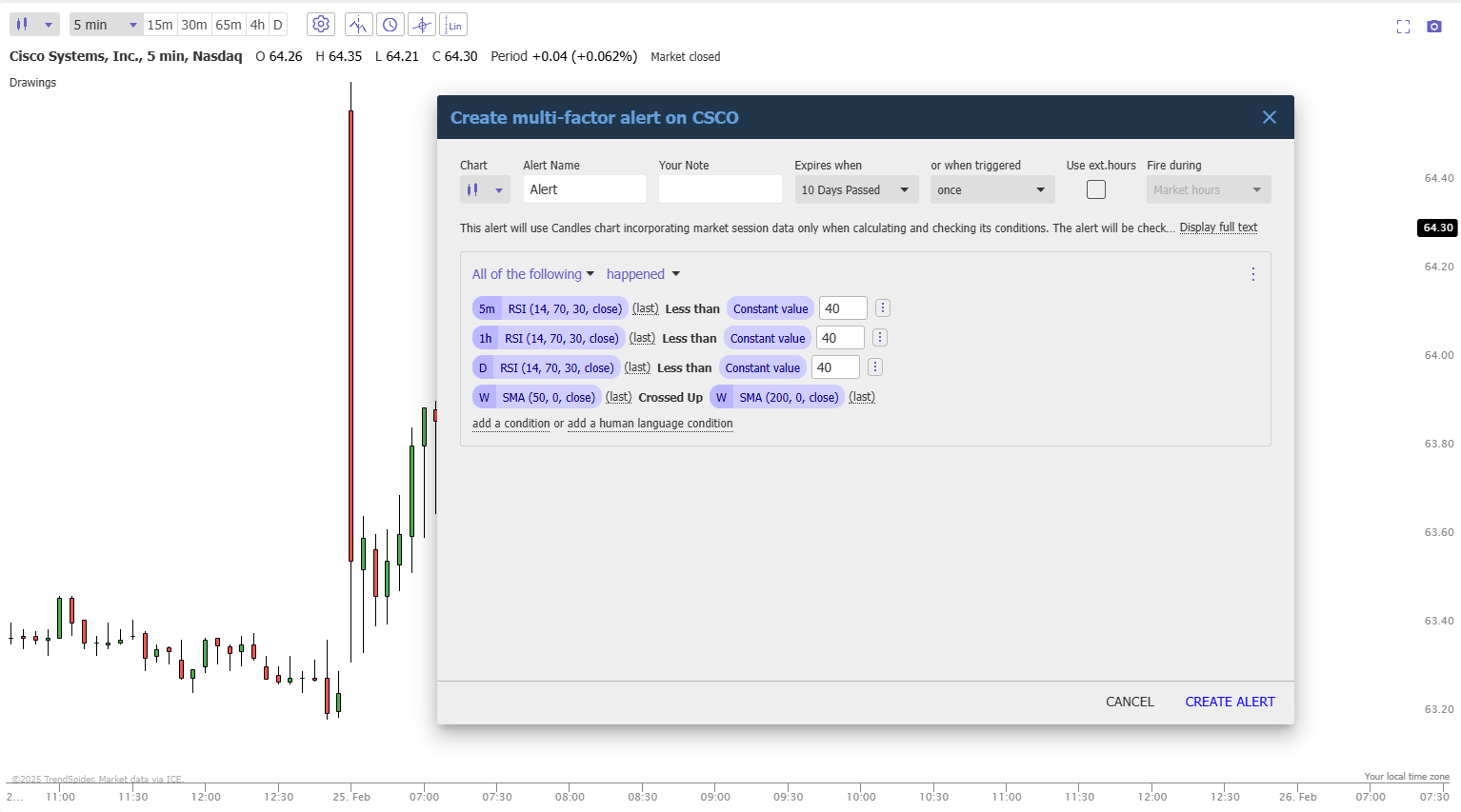
TrendSpider’s Multi-Factor Alerts can combine conditions across indicators and timeframes.
Feature Spotlight
Build alerts around multiple conditions
TrendSpider’s Multi-Factor Alerts allow traders to combine conditions from different indicators and timeframes into a single alert.
This can be useful when a setup depends on several conditions occurring together rather than a single price or indicator trigger.
The number of active alerts varies substantially by plan. The current pricing information lists 10 on Standard, 50 on Premium, 100 on Enhanced and 400 on Advanced, with the alert-retention period also varying by plan.
That difference matters if your strategy involves monitoring a large universe of symbols.
A trader following a handful of setups may never approach the lower limit. Someone building a large alert-driven workflow can reach it much sooner.
TrendSpider also warns in its terms that alerts are provided without a guarantee of uninterrupted or timely operation, so important trading decisions should not depend entirely on them.
Strategy Tester and Backtesting
Strategy Tester is one of the platform’s major tools for traders interested in systematic strategies.
Feature Spotlight
Build, test and refine strategies
TrendSpider’s Strategy Tester allows traders to test trading strategies against historical market data without manually reviewing every chart.
The platform can help evaluate how a strategy would have behaved under defined conditions, making it easier to identify potential strengths and weaknesses before applying the idea to live markets.
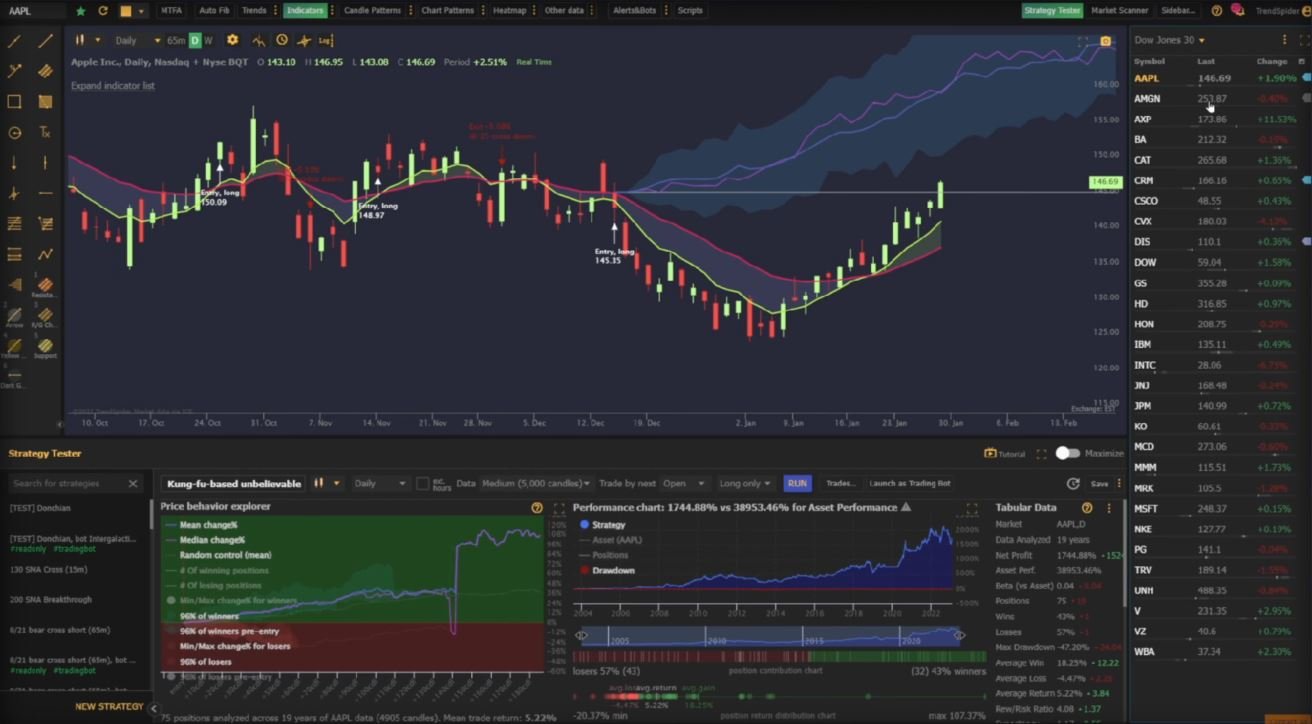
TrendSpider’s Strategy Tester provides an interface for developing and testing trading strategies.
TrendSpider allows users to build strategies through visual, point-and-click conditions, and its current product materials also support natural-language strategy workflows.
The documentation says Strategy Tester can use more than 50 years of historical market data where sufficient history exists for a symbol, although the amount available in an individual test depends on the selected timeframe, candle depth and data availability.
The current plan structure also imposes different backtesting limits. Standard supports 2-hour backtests with 2,000-candle depth, Premium 5-minute backtests with 10,000-candle depth, and Enhanced and Advanced provide 1-minute backtesting with 20,000- and 30,000-candle depths respectively.
Important backtesting limitations
A backtest is not a crystal ball.
TrendSpider’s own documentation explicitly explains that historical backtesting shows how a defined strategy would have behaved under the test assumptions; it does not establish future performance.
The company’s documentation also explains several important assumptions:
- the default model assumes perfect execution;
- zero slippage is assumed unless trade costs are modeled;
- broker and trading costs need to be accounted for where applicable;
- a strategy can produce unrealistic results if capital constraints and drawdowns are not considered;
- Strategy Tester uses a single timeframe for an individual test.
TrendSpider provides a trade-cost setting that can be used to model commissions, fees and other costs.
The practical takeaway is straightforward:
Use backtesting to investigate and challenge a strategy, not to prove that future profits are guaranteed.
Trading Bots and Automation
TrendSpider supports strategy bots that can run strategies forward using live market data.
Feature Spotlight
Move from testing to automation
TrendSpider supports strategy bots that can run strategies forward using live market data.
The platform describes these bots as position-aware alerts that can also place trades through supported execution connections. Alerts and strategy bots can also connect to external systems through webhooks.
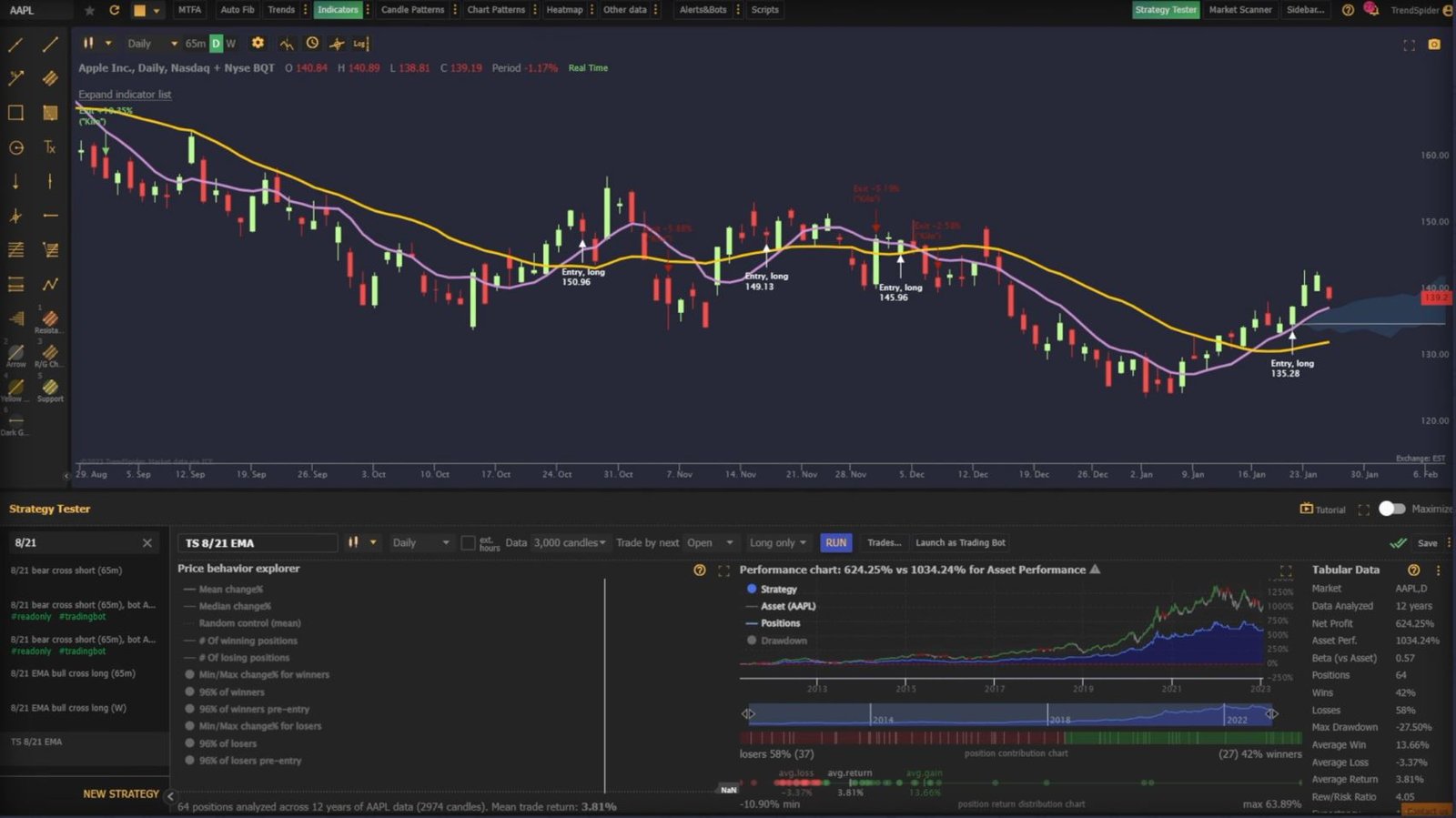
TrendSpider’s Strategy Tester interface includes an option to launch a tested strategy as a trading bot.
The company describes bots as position-aware alerts that can also place trades through supported execution connections.
The number of live bots available varies substantially by plan:
- Standard: 5
- Premium: 10
- Enhanced: 50
- Advanced: 100
For someone who only wants alerts, this capacity may be irrelevant.
For someone building a systematic trading workflow, it can become an important pricing consideration.
TrendSpider also supports connecting alerts and strategy bots to external systems through webhooks and supported execution services such as SignalStack.
Sidekick and AI
Sidekick is TrendSpider’s built-in AI research assistant.
Every base TrendSpider plan currently includes 25 Sidekick messages per month. Separate paid Sidekick packages can increase the message allowance and provide access to additional models.
TrendSpider also integrates AI into strategy development and Strategy Tester workflows. Sidekick can assist with creating, testing, refining and interpreting strategies.
The important distinction is that AI is a workflow aid — not a guarantee of profitable trading signals.
AI can help formulate, investigate and refine ideas. It doesn’t remove the need to understand the strategy or validate its assumptions.
Is TrendSpider Easy to Learn?
That depends heavily on what you want to do with it.
If you’re looking for a simple charting platform, TrendSpider’s large feature set can feel like overkill.
If you’re trying to build a workflow around scanning, technical analysis, systematic testing and automation, that same depth becomes more relevant.
Independent testing from StockBrokers.com describes the platform as complex and notes a learning curve, while also highlighting TrendSpider’s training and support resources.
So the learning curve isn’t necessarily a flaw in isolation. It’s partly a consequence of the platform trying to solve more problems inside one environment.
TradeORI Lens
The learning curve depends on what you use
A large feature set may feel like more platform than you need.
The broader toolkit becomes more relevant as your workflow becomes more systematic.
TrendSpider vs TradingView
TrendSpider and TradingView overlap in charting and market analysis, but their workflows are not identical.
TradingView is widely used for charting and market analysis, while TrendSpider puts greater emphasis on automated analysis, scanning, strategy development and trading automation.
TradeORI Comparison Lens
Compare the workflow, not just the feature list
There isn’t one universal answer for every trader.
For a deeper comparison, see our planned TrendSpider vs TradingView guide.
TrendSpider Alternatives
The right alternative depends on what you’re actually trying to accomplish.
Alternatives Worth Researching
Different platforms solve different problems
Ask which platform gives you the capabilities you actually use without paying for complexity you don’t need.
If you primarily want straightforward charting, you may not need TrendSpider’s full research and automation stack.
If your priority is sophisticated scanning, systematic strategy research or automated execution, you’ll want to compare platforms specifically on those capabilities.
Who Should Consider TrendSpider?
TrendSpider is particularly worth investigating if your workflow involves several of these:
TradeORI Fit Check
Does TrendSpider match your workflow?
May fit your workflow
- Technical analysis across many symbols
- Automated technical analysis
- Multi-factor market scanning
- Systematic strategy development
- Historical backtesting
- Alerts across a large watchlist
- Automated trading strategies
- AI-assisted research
- Combining research and automation in one platform
May need less complexity
- Primarily simple charting
- Rarely scanning more than a small number of assets
- Little or no systematic strategy testing
- No interest in alerts or automation
- Limited need for AI research tools
- Preference for fewer moving parts
TradeORI Lens: The more of the platform you actually use, the more relevant its broader toolkit becomes. This is a workflow question, not a universal product ranking.
Is TrendSpider Worth It?
The answer depends on how much of its toolkit you will actually use.
If you are an active trader who wants automated technical analysis, sophisticated scanning, strategy testing, AI-assisted research and automation in one environment, TrendSpider offers a substantial collection of tools to investigate.
If you only need basic charting and occasional technical analysis, much of that additional functionality may be unnecessary.
Before subscribing, ask yourself:
TradeORI Decision Checklist
Before subscribing, check your actual workflow
Do I need advanced scanning across multiple conditions?
Will I actually use automated technical analysis?
Will I build and test trading strategies?
Do I need alerts across many symbols or trading bots?
Will I use Sidekick enough to justify additional AI costs?
Do I understand the assumptions behind the backtests?
Which market-data feeds do I actually need?
Which plan’s limits match my workflow?
Those questions are more useful than simply asking whether TrendSpider is “good.”
Final Take
TradeORI Bottom Line
TrendSpider is more than a charting platform
TrendSpider is best understood as a broad market-research, strategy-development and automation platform, rather than simply another charting tool.
Its current feature set combines scanning, automated analysis, strategy testing, AI-assisted workflows, alerts and automation.
Pricing is promotional and capacity varies considerably between plans. AI usage has a base monthly message allowance with paid upgrades available. Backtesting is useful but comes with important assumptions, and different platform functions can rely on different third-party data feeds.
If those capabilities match your trading workflow, TrendSpider is worth investigating.
Before subscribing, check the current pricing page and make sure the plan’s actual limits, data requirements and renewal terms match how you intend to use the platform.
Ready to see if TrendSpider fits your trading workflow?
Check the latest plans, pricing, trial terms and platform capabilities before you decide.
Frequently Asked Questions
TrendSpider FAQ
Is TrendSpider worth it?
It depends on your workflow. Traders who need advanced scanning, strategy testing, automation and AI-assisted research may have more reason to use its broader feature set than traders who only need basic charting.
How much does TrendSpider cost?
TrendSpider currently offers Standard, Premium, Enhanced and Advanced plans. Displayed promotional pricing and billing terms vary, and the plans have different usage limits. Check the current pricing page before subscribing.
Does TrendSpider have a trial?
Yes. TrendSpider’s current pricing pages advertise a 14-day trial. The amount charged during the trial and the promotional subscription price can vary by plan and promotion.
Does TrendSpider have backtesting?
Yes. Strategy Tester allows users to create and test trading strategies against historical data. TrendSpider also documents limitations involving execution, slippage, costs, capital assumptions and timeframe handling.
Does TrendSpider use AI?
Yes. TrendSpider currently offers Sidekick AI and integrates AI into research and strategy-development workflows.
Does TrendSpider have trading bots?
Yes. TrendSpider supports automated strategy bots, with the number of live bots varying by subscription plan.
Is TrendSpider good for beginners?
It can be used without conventional programming knowledge for core strategy-testing workflows, but the platform has a broad feature set. Independent testing has noted a learning curve, so beginners should consider whether they actually need that level of functionality.
What are the main TrendSpider alternatives?
TradingView is an obvious comparison for charting and market analysis, while other alternatives include tools focused on screening, research, automation or quantitative strategy development. The right alternative depends on which capabilities matter most to your workflow.